In the high-speed world of digital marketing, data is your superpower.
You’re investing time and money into ads, social posts, emails, and influencer collabs. But if you can't definitively answer the question, "What is actually driving revenue?"—you're just guessing.
That's where UTM parameters and a simple, powerful UTM Builder tool come in. They are the non-negotiable practice for any marketer who wants true visibility into their traffic.
Stop wasting time with confusing spreadsheets and manual, error-prone link creation. We built the free ToolNexIn UTM Builder to generate error-free, trackable URLs within seconds, turning guesswork into precise action.
Ready to track your marketing campaigns like a pro? Let's dive in.
What is a UTM Builder and How Does it Work?
Think of a UTM Builder as a digital label-maker for your links.
Every link you share should tell your analytics tool (like Google Analytics 4) exactly where the click came from. Without this label, all your hard work on Instagram, Facebook, and email just gets lumped into one vague "referral" bucket.
A UTM Builder simply helps you attach these vital UTM parameters (Urchin Tracking Module) to your URL.
The Magic of a Trackable Link
See the difference:
| Standard Link | Trackable UTM Link |
|---|---|
| https://toolnexin.com/ | https://toolnexin.com/?utm_source=instagram&utm_medium=social&utm_campaign=summer_sale |
When someone clicks the second link, your analytics immediately registers:
- Source: Instagram
- Medium: Social
- Campaign: Summer Sale
The result? You know, with 100% certainty, which specific action drove that visit, lead, or sale.
Why UTM Tracking is Your Marketing Secret Weapon
Every top digital marketer relies on UTMs. Here’s why this practice is essential for your success:
- Accurate Campaign Attribution: Finally know if that recent Facebook Ad or your influencer partnership is performing.
- Precise ROI Measurement: Identify the campaigns that are actually profitable so you can cut the ones draining your budget.
- Smarter Budget Allocation: Once you know what converts, you can immediately shift your spending to the winning channels.
- Effortless A/B Testing: Test multiple creatives or headlines easily by giving each one a unique link label (utm_content).
- Cleaner Reporting: Say goodbye to vague reports! Your monthly analysis becomes insightful, actionable, and much easier to create.
The 5 Essential UTM Parameters (Explained Simply)
A complete UTM link uses up to five parameters. The first three are required to make your link effective:
1. utm_source (Required)
What is it? Where the traffic originated.
- Examples: google, facebook, newsletter, influencer_name
2. utm_medium (Required)
What is it? The general marketing channel used.
- Examples: cpc (for paid ads), social, email, referral
3. utm_campaign (Required)
What is it? The specific name of your promotion or initiative.
- Examples: black_friday_2025, summer_sale, product_launch
4. utm_term (Optional)
What is it? Used primarily for search ads to track the keywords that triggered the ad.
- Example: best_shoes
5. utm_content (Optional)
What is it? Used to differentiate specific items within the same ad or campaign.
- Examples: header_banner, footer_link, testA, ad1
How to Use the ToolNexIn UTM Builder (In 6 Seconds)
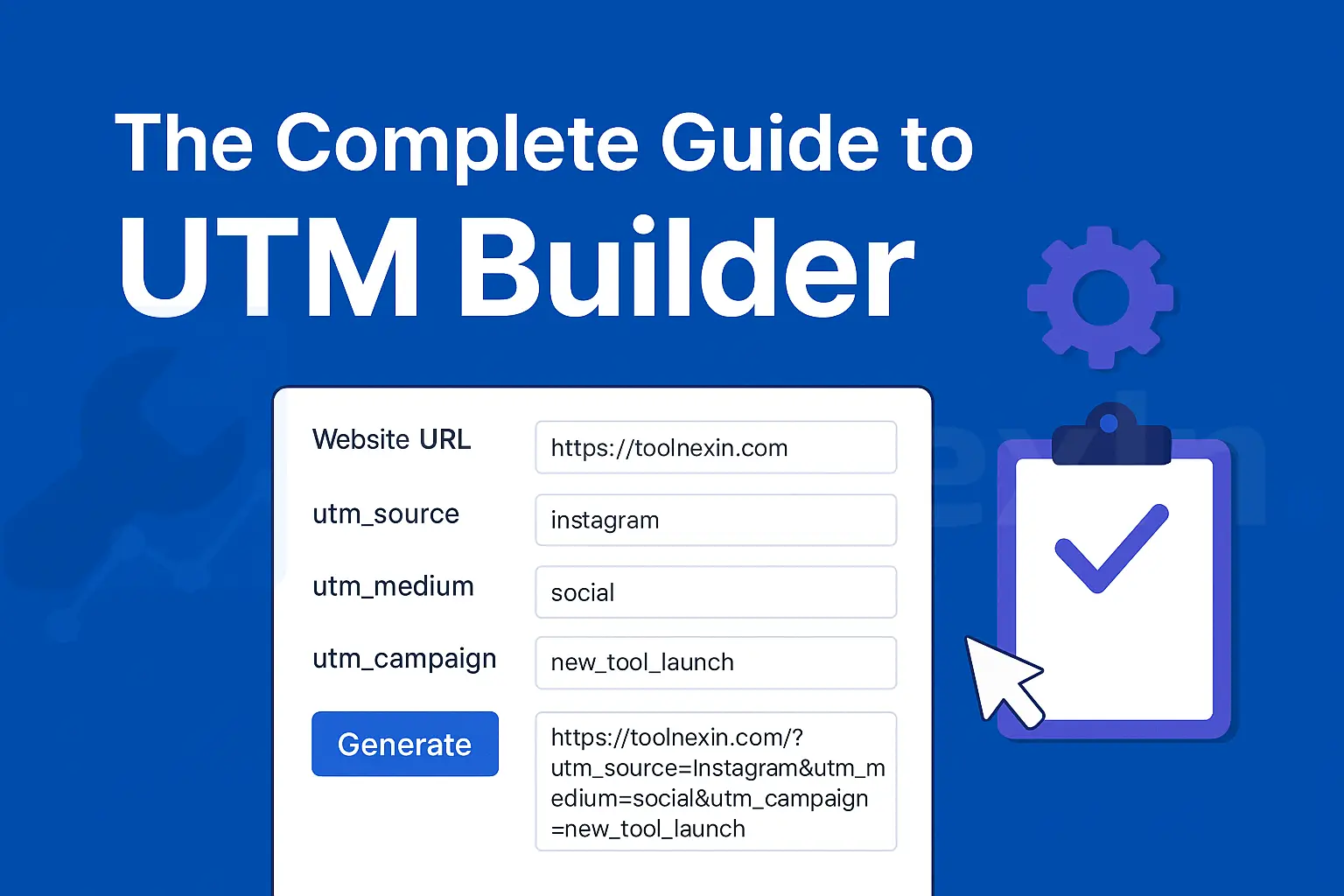
Forget clunky spreadsheets. Our free UTM Builder is designed for speed and accuracy, requiring zero technical knowledge.
Step-by-Step Guide:
- Enter Your Website URL: Paste the destination URL you want to track (e.g., https://toolnexin.com/).
- Add UTM Source: Input where the link will be shared (e.g., instagram).
- Add UTM Medium: Specify the channel (e.g., social).
- Add UTM Campaign Name: Define the promotion (e.g., new_tool_launch).
- Optional Fields: Add utm_term or utm_content only if needed for differentiation.
- Generate & Copy: The perfectly formatted UTM link is instantly generated and ready to use in your social media posts, ads, and emails!
Why Choose the ToolNexIn UTM Builder?
| Feature | Benefit |
|---|---|
| Real-Time Generation | The link appears instantly as you type. |
| Zero Errors | No more worrying about missing ? or incorrect & placement. |
| 100% Free Forever | No login, no subscription, no restrictions. |
| Mobile-Friendly UI | Create tracking URLs from your phone anytime, anywhere. |
Where Should You Use Your New UTM Links?
If you want to track it, you need a UTM link. Here are the top use cases:
- Social Media Posts: Track performance on Instagram, Facebook, X (Twitter), LinkedIn, and YouTube.
- Paid Advertising: Know exactly which ad set or creative brought the click.
- Email Marketing: Measure clicks within your newsletters, automation flows, and signature links.
- Influencer Campaigns: Assign unique utm_source links to each influencer to measure their exact ROI.
- Offline Marketing: Convert your UTM link into a QR Code (using our QR Code Generator!) to track offline-to-online traffic from posters or flyers.
UTM Tracking Best Practices: Be Consistent!
UTMs are powerful, but they are also case-sensitive. A lack of consistency will make your analytics reports a nightmare.
Follow these golden rules for every campaign:
| Rule | BAD Example | GOOD Example |
|---|---|---|
| Use Lowercase | ||
| Avoid Spaces | summer sale | summer_sale or summer-sale |
| Be Consistent | Using IG, Insta, and instagram for the same platform. | Always use instagram. |
| Keep it Short | product_launch_q4_2025_beta_test | product_launch_q4 |
Pro Tip: Shorten Your UTM Links!
UTM links can get very long and messy. Always combine your ToolNexIn UTM Builder with a URL Shortener (ToolNexIn offers one!) before sharing. A short, clean link looks more trustworthy, especially on social media.
ToolNexIn's Marketing Ecosystem: More Than Just a UTM Builder
The UTM Builder is just the start. To help you manage and optimize your marketing campaigns seamlessly, ToolNexIn provides a suite of complementary tools that integrate perfectly with your tracking efforts:
- URL Shortener: Don't let long, messy UTM links intimidate your audience. Use our URL Shortener to create clean, trustworthy, and clickable links for social media and emails.
- QR Code Generator: Taking your marketing offline? Convert your trackable UTM links into scannable QR Codes. This is essential for measuring the success of posters, flyers, and physical ads.
- Base64 Encoder/Decoder: A powerful utility for advanced marketers and developers needing to secure or format specific data streams.
- Technical Utilities (Domain Age Checker, IP Lookup, JSON Formatter): These resources are invaluable for technical teams, helping with everything from domain research to data manipulation and debugging.
Every tool in the ToolNexIn collection shares the same philosophy: a clean layout, easy structure, and fast loading experience, ensuring your workflow is always efficient.
Frequently Asked Questions (FAQ)
1. Is UTM tracking free?
Yes! UTM parameters are a standard web practice and are supported by Google Analytics 4 (GA4) and all other major analytics platforms at no cost.
2. Do UTMs affect SEO?
No, UTMs do not affect your organic search engine optimization (SEO) rankings. Search engines understand and ignore these parameters when crawling your site.
3. Are UTMs safe?
Yes, they are safe. However, as a best practice, avoid putting any highly sensitive or personal information directly into the parameters.
Conclusion: Stop Guessing, Start Tracking
In the end, UTM tracking is the backbone of truly data-driven marketing. Without it, you are simply operating on hopeful assumptions. With the power of a tool like the ToolNexIn UTM Builder, you gain clear, precise, and actionable insights into every single click.
Ready to take full control of your campaign analytics, boost your ROI, and finally know what’s working?
Start generating error-free UTM links with the free ToolNexIn UTM Builder today!